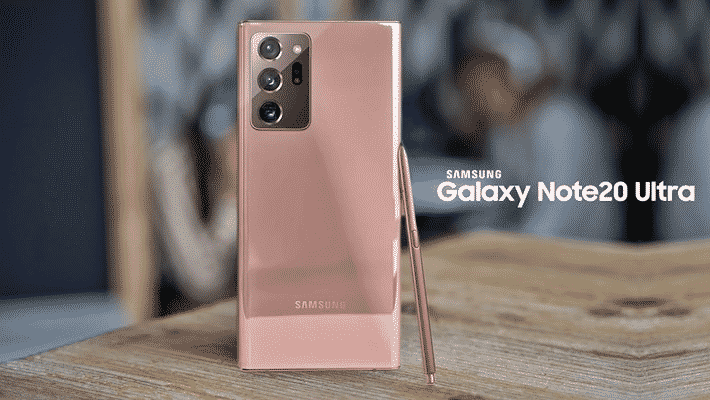

The Samsung Galaxy Note 20 Ultra is Samsung’s large-screen flagship for 2020, and this review is based on a unit used daily since August 5. It covers the design and build, the display, performance and software, the S Pen, the cameras, and battery life, with the measured test results gathered during that time.
Design & Build
The Note 20 Ultra is a large phone. It measures 164 mm long, 77 mm wide and 8.1 mm thick, built around a 6.9-inch screen, and it weighs 208 grams. The size is noticeable in the hand, so it is not a phone meant for comfortable one-handed use. It is slightly thinner and slightly lighter than the Galaxy S20 Ultra that shares much of its design language.
It comes in three finishes: Mystic Black, Mystic White and Mystic Bronze, with the copper Mystic Bronze standing out as the signature colour. The front uses Gorilla Glass Victus, which Corning describes in its statement as its most durable glass to date, rated for drops of up to two meters onto hard, uneven surfaces and tested extensively for scratch resistance. The Ultra pairs a glass back with an aluminium frame, and both the glass and metal carry a matte finish that resists fingerprints.
The phone carries IP68 certification, so it is protected against fresh water down to 1.5 meters for up to 30 minutes. The bottom edge holds the S Pen slot, the USB-C port and a speaker grille, with a second speaker in the earpiece for stereo sound; the box includes AKG-tuned earphones. Storage can be expanded up to 1 TB with a microSD card, though the card slot is shared with the second SIM, so users cannot run dual SIM and microSD at the same time.

Display
The 6.9-inch Dynamic AMOLED panel runs at a resolution of 1440×3088 pixels, with a pixel density of 496 ppi, HDR10+ support and a 120Hz refresh rate. The screen curves toward the edges, which keeps the side frames from cutting into the image and widens the viewing area. The curve does mean the palm occasionally registers an accidental touch when reaching for the top corner.
The 120Hz refresh rate and the full WQHD+ resolution cannot be used together. Running the display at 120Hz limits the resolution to FHD+, and the full WQHD+ resolution is available only at 60Hz. The 120Hz mode is smooth in scrolling and app transitions, and the difference against 60Hz is clear when the two are viewed side by side. The fingerprint reader sits under the display and responds quickly, and face recognition through the front camera is also available.

Performance & Software
This unit uses the Exynos 990, the same chip found in the Galaxy S20 series. It is an eight-core processor: two Prime cores run at 2.73 GHz and the remaining six run at 2.0 GHz with an efficiency focus. It is paired with 12 GB of RAM, and storage comes in 256 GB and 512 GB options. There is a regional split worth noting honestly: the version sold with the Snapdragon 865 runs faster and, by common report, manages battery and heat better than the Exynos version, so buyers in Exynos markets are getting the slower of the two variants.

In our benchmark runs the Note 20 Ultra scores 530,864 in AnTuTu, and in Geekbench it returns 939 on the single-core test and 2,774 on the multi-core test. In everyday use the phone feels quick, and the gap between these numbers and other high-end phones is hard to notice in normal tasks.
The software is Android 10 with the One UI 2.5 interface. The quick-settings drawer gathers shortcuts for the blue-light filter, dark mode, screen recorder, secure folder, Smart View screen sharing and Edge lighting. The Game Launcher collects games in one place and tracks time spent in each, and its Game Booster lets the user pick a balanced or high-performance profile, enable Dolby Atmos, or drop the refresh rate to 48 Hz to save power during long sessions. The phone also supports Xbox cloud gaming through Game Pass Ultimate, so cloud titles stream to the handset.
S Pen
The S Pen is the feature that defines the Note line, and on the Note 20 Ultra its latency drops to 9 ms, which makes writing on the screen feel closer to a real pen on paper. It keeps the abilities the line has built up: remote control through air gestures, air actions for the camera so users can switch lenses and modes, zoom and capture without touching the phone, handwriting-to-text conversion, and AR Doodle for drawing over photos and video through the front camera. Samsung Notes synchronises notes between the phone and a computer.
Camera
The Note 20 Ultra carries a triple rear camera in a large raised block. The main sensor is 108 MP with an f/1.8 aperture, a 26 mm focal length, OIS and phase-detection autofocus, and Samsung adds laser autofocus here to address the focusing issues seen on the S20 series. The second camera is a 12 MP periscope telephoto with phase detection and OIS, offering 5x optical and 50x hybrid zoom. The third is a 12 MP ultra-wide with a 120-degree field of view. There is no dedicated depth camera; the ToF 3D sensor used on the S20 Ultra is not included here.
On the front is a 10 MP selfie camera with an f/2.2 wide-angle lens and Dual Pixel phase-detection autofocus. Its main addition over the Note 10 Plus is 4K video capture at 60 frames per second, up from 30 frames.

In our testing the cameras perform well. The 108 MP mode has to be turned on from the top of the camera interface, and selecting it removes the zoom options, but it adds real detail to landscape shots. For most photography the phone settles into its default 12 MP mode, which produces pleasing colour saturation and vivid results. In practice the very large sensor does not translate into a dramatic jump in image quality over the day-to-day 12 MP output, so the size of the camera block reads more as a design decision than a photographic necessity.
Battery
The Note 20 Ultra holds a 4,500 mAh battery, which is enough for roughly a day of heavy use, and the result shifts noticeably with the refresh rate and power settings. The scenarios below use the default out-of-box settings, running similar apps and comparable screen-on time in each test; individual results vary with use.
In the first scenario, at 120Hz, the phone came off the charger at 9:00 in the morning and reached 6 hours and 30 minutes of screen-on time, including about 3 hours of Netflix, 1 hour 17 minutes of WhatsApp and 30 minutes of Instagram, finishing at 11 percent around 00:30. In the second scenario the next day, at 60Hz with similar use, the charge stood at 45 percent around 00:30. The gap between the two comes to 34 percentage points between 120Hz and 60Hz under default settings.
With Adaptive Power Saving enabled and the screen back at 120Hz, the phone came off the charger at 07:00 and ran to a full discharge at 23:00, a 16-hour day with 9 hours and 53 minutes of screen-on time across roughly 5 hours of Netflix, 1.5 hours of Full HD video and social media and calls through the day. These are intensive-use figures; lighter multimedia use stretches the battery toward a second day, and Medium and Maximum Power Saving modes extend it further. In a standard Full HD video test at full brightness over 90 minutes on Wi-Fi, the phone drained 11 percent.
Using the in-box charger, the Note 20 Ultra reaches a full charge in about 1 hour and 5 minutes, and the pace is steady rather than aggressive, which is easier on the battery over the long run:
| Time | Charge |
|---|---|
| 10 minutes | 20 percent |
| 20 minutes | 42 percent |
| 30 minutes | 59 percent |
| 40 minutes | 74 percent |
| 50 minutes | 87 percent |
| 1 hour | 94 percent |
| 1 hour 5 minutes | 100 percent |
Who Is Samsung Galaxy Note 20 Ultra For?
The Note 20 Ultra suits users who want a large flagship built around the S Pen: note-takers, sketchers and anyone who values the pen’s low-latency writing, remote camera control and note syncing. The 6.9-inch 120Hz Dynamic AMOLED, stereo AKG-tuned sound, 12 GB of RAM, expandable storage and a 4,500 mAh battery that clears a full day make it a capable all-rounder for media and productivity. It is a large, heavy phone, so it is less comfortable for those who want one-handed use, and its very big camera block delivers solid rather than transformative photos. Buyers in Exynos regions should also weigh the performance and efficiency gap against the Snapdragon variant. For users who want the full Note experience at flagship scale, it delivers what it sets out to.
Bu incelemeyi nasıl hazırladık?
Teknik değerleri güvenilir kaynaktan alır, kendi sözümüzle kurar, kaynağını gösteririz. Ölçülmüş bağımsız test emeğini kendimize mal etmeyiz. Puan vermedik: kanaat, sıralama değil.
İşine uyanı gördüysen, gerisini merak etme — en pahalı değil, sana denk geleni almak en rahatı; kararın da, paran da bereketli olsun.
Okuyucu deneyimleri & sorular
Bu ürünü gerçekten kullananların notları — çoğu zaman incelememizden daha kıymetli. Puan/beğeni yok; işaret güven içindir: neyin faydalı, neyin şüpheli olduğunu topluluk gösterir.
Katkı için yola katıl.
Deneyimini paylaşmak ya da bir soru sormak için üye ol; okumak herkese açık. Emeğin kayıt altında, kıymeti kazanılır.