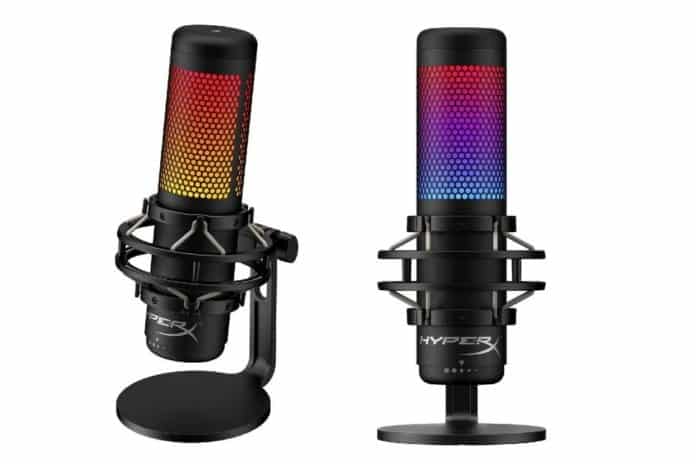
The HyperX QuadCast returns here in a new form: the QuadCast S, dressed in RGB lighting. Alongside it sits a simpler sibling, the QuadCast Solo, aimed at single-person streams. This review looks at both, what they share and where they part.
The QuadCast S carries full RGB lighting across its body, which is the headline change over the earlier model. The Solo drops that lighting and trims the feature set. Below, we go through the design and specifications of each.
Why a USB microphone
For video broadcasts or podcast recordings, a good gaming headset with a solid boom microphone will do the job. For more professional results, a USB microphone is the step up: the clarity and richness it captures go beyond what a headset boom mic delivers.
The QuadCast S fits both broadcasting and podcast work. The QuadCast Solo has fewer features and no RGB lighting, sitting below it in the range.
HyperX QuadCast S design
The QuadCast S has soft rubber caps at the top and bottom. A tap on the top edge mutes the microphone, which makes silencing it during a broadcast simple. The lower edge turns to adjust the recording volume.
Just below the grille at the back sits a four-mode wheel, covered in more detail further down. The lower edge holds two ports: headphone and USB.
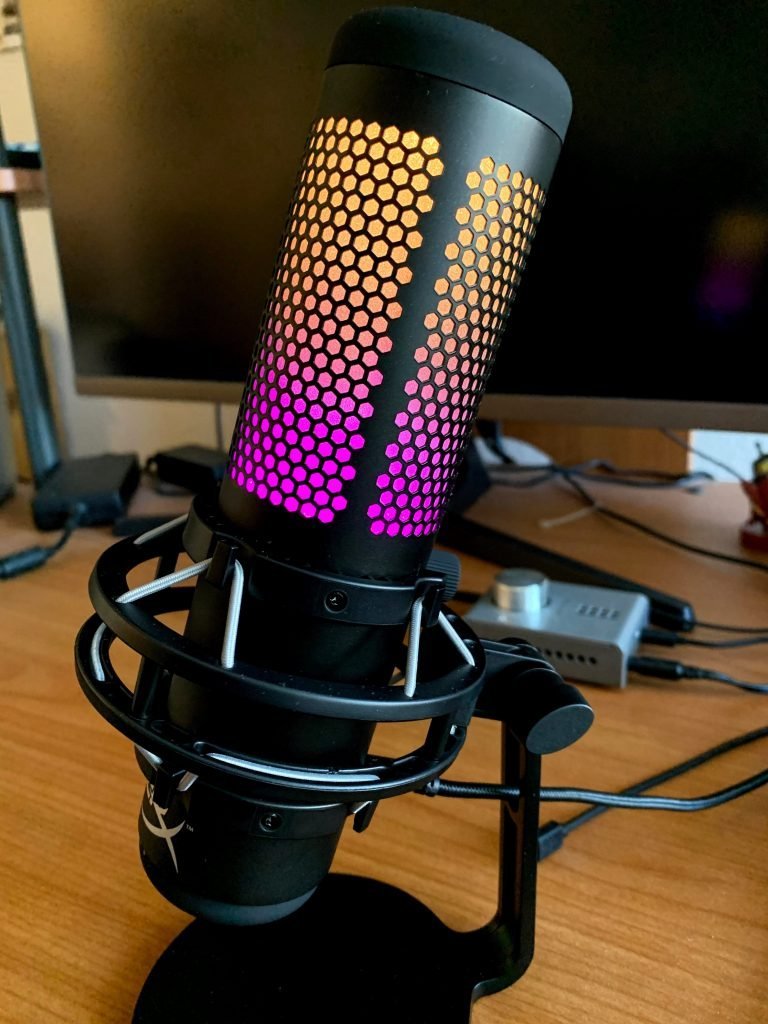
The QuadCast S ships mounted on a stand with a built-in shock absorber, so it can sit on a desk or hang to the side. A mounting adapter is included for attaching it to microphone stands or boom arms.
The QuadCast Solo is the simpler model: smaller, with no lighting. A red LED on the front shows when it is active. A button on top mutes it, and a flexible stand handles positioning. It also fits boom arms and microphone stands.
HyperX QuadCast S features
Both are suited to streaming, with the QuadCast S carrying the fuller feature set. A built-in pop filter guards against the explosive sounds that interrupt speech, so no separate shield is needed. In our test recordings the audio came through clearly. On features, it matches the predecessor model closely; the main difference between the two is the RGB lighting.
The specifications: a frequency response of 20 Hz to 20 kHz, three 14 mm condenser microphones, sensitivity of -36 dB, and 16-bit sampling at 48 kHz. Placed next to the earlier red-lit QuadCast, the technical numbers are the same; the change is the lighting rather than the internals.
Mode wheel
The QuadCast S offers a four-way polar pattern selection: stereo, omnidirectional, cardioid, and bidirectional. This lets the pickup be matched to the situation. Cardioid focuses on sound from the front and suits solo video and podcast recording.
Looking for a headphone instead? Read our HyperX Cloud Stinger Core review: https://www.techblimp.com/2020/09/16/hyperx-cloud-stinger-core-review/
Stereo works for two people side by side. Omnidirectional picks up from all directions and suits conferences and larger groups. Bidirectional handles a conversation between two facing sources. Each pattern targets a different recording setup.
The QuadCast Solo has a single condenser microphone and works in cardioid mode only. Other setups are outside its scope; as the name suggests, it is built for solo recordings.
Platforms and lighting
Both microphones run on PC, Mac, and PlayStation, following plug-and-play. The cables suit typical desk distances: 2 meters on the QuadCast Solo, 3 meters on the QuadCast S.
HyperX QuadCast S software
The QuadCast S lighting is controlled through HyperX’s NGENUITY software, which was still in beta at the time. The audio section handles the sound setting, while the lights tab offers five effects and a free choice of color for the microphone.
You can reach the HyperX QuadCast S software here: https://www.hyperxgaming.com/us/microphone/quadcast-gaming-microphone
The software does not support the QuadCast Solo, which has no lighting to configure and runs purely plug-and-play. The QuadCast S is the same in practice, apart from the lighting settings.
We used the QuadCast S over a stretch of time and found its performance satisfying. The previous QuadCast was already a capable model. The QuadCast S adds RGB rather than new features, which is what sets it apart. For a solo streamer who does not need the lighting or the extra polar patterns, the Solo covers the basics; for multi-pattern recording with adjustable lighting, the QuadCast S is the fuller option.
Bu incelemeyi nasıl hazırladık?
Teknik değerleri güvenilir kaynaktan alır, kendi sözümüzle kurar, kaynağını gösteririz. Ölçülmüş bağımsız test emeğini kendimize mal etmeyiz. Puan vermedik: kanaat, sıralama değil.
İşine uyanı gördüysen, gerisini merak etme — en pahalı değil, sana denk geleni almak en rahatı; kararın da, paran da bereketli olsun.
Okuyucu deneyimleri & sorular
Bu ürünü gerçekten kullananların notları — çoğu zaman incelememizden daha kıymetli. Puan/beğeni yok; işaret güven içindir: neyin faydalı, neyin şüpheli olduğunu topluluk gösterir.
Katkı için yola katıl.
Deneyimini paylaşmak ya da bir soru sormak için üye ol; okumak herkese açık. Emeğin kayıt altında, kıymeti kazanılır.