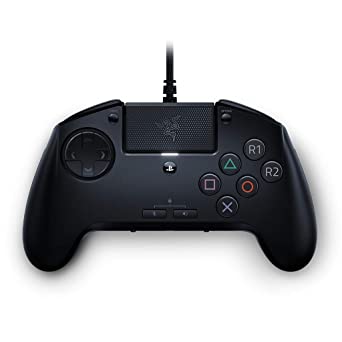
The Razer Raion Fightpad is a controller built specifically for fighting-game players. Fighting games hold a firm place in gaming history and keep a dedicated following, yet they sit outside the mainstream. Street Fighter and Mortal Kombat lead the field, and the roster of established series stays small. Even so, the players who invest in this genre invest heavily, and Razer, already present in the space with its Panthera Fight Sticks, addressed them with the Raion.
What is a Fightpad, and why not just call it a gamepad?
A Fightpad is a gamepad without analog sticks, offering a modern take on the six-button fighting machines of the nineties. It can be used in other games, but its layout is shaped around fighting games and the needs of those players, which makes it a niche device.
Razer’s solution looks like a Raiju stripped of its analog arms, though the two share little beyond that impression. The front carries face buttons that map to the PlayStation theme, six of them rather than four. The L1/R1 and R2/L2 buttons are present but give only a tactile press, so they are not suited to acceleration and braking in a racing game. The mode-switching button found on the Raiju Ultimate is absent here. The result is a controller built around one purpose, most efficient in the games it targets.
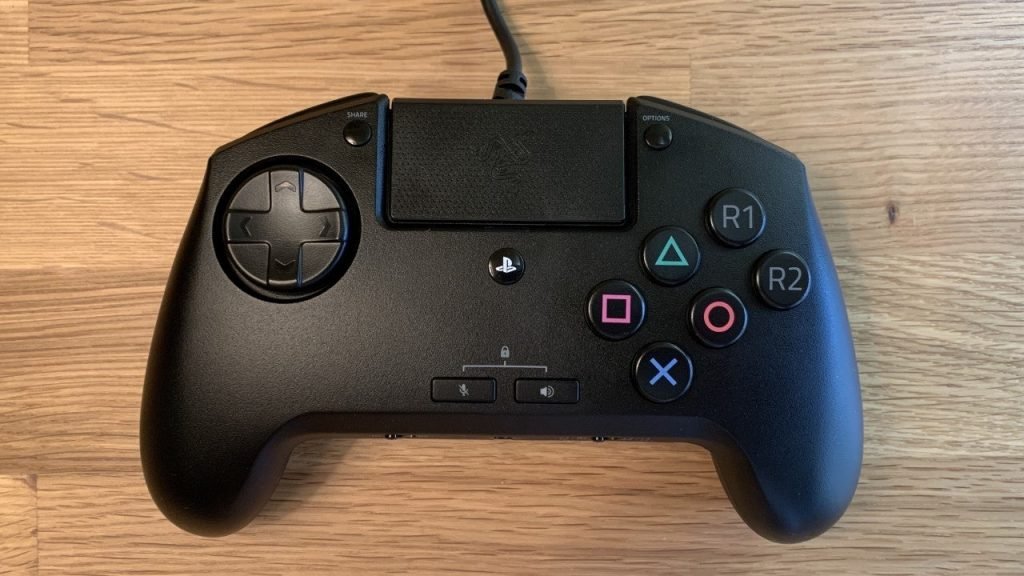
On the front face, the buttons are larger and more spaced out than on the classic DualShock and Raiju line. Unusual at first, this layout makes it easier to run combos without tangling your fingers. The buttons use the Razer Yellow Switch, a silent, fast switch tuned for performance. With a 45cn operating weight and a 1.2mm actuation point, the keys register commands quickly and pass them to the game with little travel. Each switch is rated for 80 million presses.
Razer Raion Fightpad Features
The D-Pad follows a standard shape but adds some notable behavior. Razer’s Mecha-Tactile D-Pad reads eight axes rather than four, so a diagonal input no longer requires pressing two sides of the + at once, which improves control precision. A switch in the lower-left area lets the D-Pad act as the left/right analog instead. A bumper switch in the lower-right area can disable the extra R1/R2 buttons on the front, and the trigger keys can run in either an L1/L2-R1/R2 or an L3/R3-L1/L2 layout.
The PS4 touchpad also sits on the front surface. Unlike the Raiju Ultimate, the device has no RGB lighting, and it works only on PS4 and PC over a wired connection. A button underneath the device selects the platform in use.
Razer Raion Fightpad Notes
Headphones and a microphone connect to the Fightpad through a 3.5mm jack, though this jack works only on PS4 and not on PC. Volume and microphone-mute keys sit on the front surface as well. For a related headset, see our Logitech G432 review: https://www.techblimp.com/2021/01/01/logitech-g432-review/
Razer fits a wide range of settings onto the Raion without the front looking crowded, which also removes any need for Razer Synapse. Up to four Raions can connect to the same PS4 for local play.
In Brief
The Raion keeps its feature set focused while staying accessible on price. To do that, Razer left out extras such as RGB lighting, a carrying case, and swappable keys. It sells for $100, half the price of the Panthera Fight Sticks. Whether that spend is worth it for a genre you could also play on a standard gamepad comes down to preference. The Raion is a niche product, and it handles its intended focus well.
Bu incelemeyi nasıl hazırladık?
Teknik değerleri güvenilir kaynaktan alır, kendi sözümüzle kurar, kaynağını gösteririz. Ölçülmüş bağımsız test emeğini kendimize mal etmeyiz. Puan vermedik: kanaat, sıralama değil.
İşine uyanı gördüysen, gerisini merak etme — en pahalı değil, sana denk geleni almak en rahatı; kararın da, paran da bereketli olsun.
Okuyucu deneyimleri & sorular
Bu ürünü gerçekten kullananların notları — çoğu zaman incelememizden daha kıymetli. Puan/beğeni yok; işaret güven içindir: neyin faydalı, neyin şüpheli olduğunu topluluk gösterir.
Katkı için yola katıl.
Deneyimini paylaşmak ya da bir soru sormak için üye ol; okumak herkese açık. Emeğin kayıt altında, kıymeti kazanılır.