
Apple continues to share some of new features. Dark mode is one of them. Apple has spoken a lot about Dark Mode in the past like at its WWDC (Worldwide Developer Conference) this year.
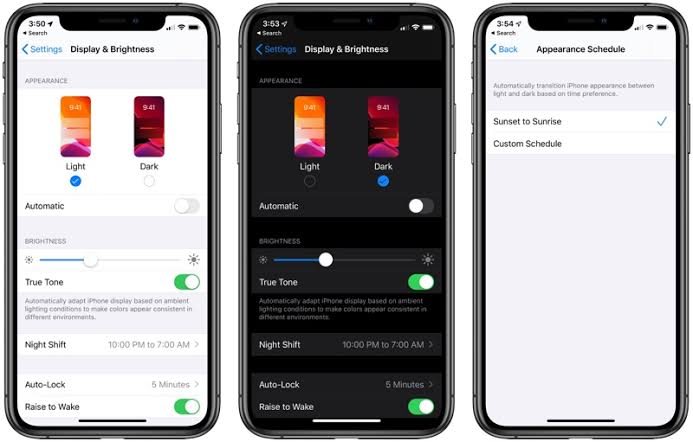
The new updates constantly are coming to operating systems. The feature of dark mode is adding for IOS 13. With a simple button in Control Center, you will be able to switch from a light interface to a dark interface. Many apps have begun to updated dark mode such as messages, calendar, music, instagram.
We can also use dark mode at night without light more. Dark mode is more useful than light mode on the eyes. It has become very common among users. So many people prefer to use dark mode. The reason we use the dark mode is that we know that night light blinds our eyes. Apple could be able to save battery and present a nice look in this app.

How to Open Dark Mode in iOS 13
- Step: go to your device’s setting section
- Step: tap screen bright
- Step: You can choose the dark mode option of your choice.
Bu incelemeyi nasıl hazırladık?
Teknik değerleri güvenilir kaynaktan alır, kendi sözümüzle kurar, kaynağını gösteririz. Ölçülmüş bağımsız test emeğini kendimize mal etmeyiz. Puan vermedik: kanaat, sıralama değil.
İşine uyanı gördüysen, gerisini merak etme — en pahalı değil, sana denk geleni almak en rahatı; kararın da, paran da bereketli olsun.
Okuyucu deneyimleri & sorular
Bu ürünü gerçekten kullananların notları — çoğu zaman incelememizden daha kıymetli. Puan/beğeni yok; işaret güven içindir: neyin faydalı, neyin şüpheli olduğunu topluluk gösterir.
Katkı için yola katıl.
Deneyimini paylaşmak ya da bir soru sormak için üye ol; okumak herkese açık. Emeğin kayıt altında, kıymeti kazanılır.